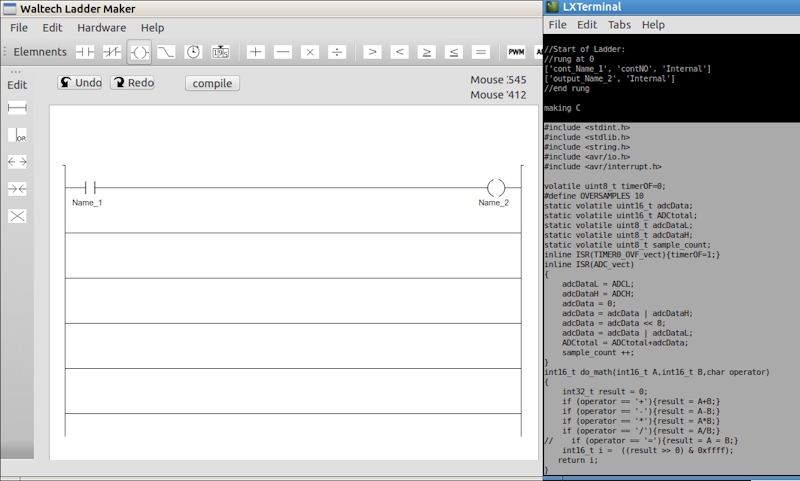
Waltech LadderMaker Ladder Logic Software
Video Playlist:

Download:
5/12/2015 version 110a
Fixed upload to new Mega bootloader.
More than one ADC can be used now. Multiple parallel circuits warning.
↓ LadderMaker Python Source v.110a
11/08/2014 version 1.07a
Added Arduino Nano support. PWM, ADC elements available on Arduio Uno and Nano. Note: There are
fewer input and output pins now to make room for PWM and ADC.
Some bugfixes. Thanks to Adam J. and Mark W.
↓ LadderMaker Python Source v.107a
↓ LadderMaker for Windows v.107a
Notes:
Unzip download. No installation required.
Running Python Source: Browse to Program
folder, open a terminal, and run main.py. Requires Python 2.7 and pyQt4. Must be run in a terminal for
USB testing and upload to work.
LadderMaker Linux Boot Disk iso. Download,
burn iso to a CD, and boot to the CD. Laddermaker folder is on the desktop.
Check the version. If a later version of the Source is available here, download it, and replace the
Program and Helpers folders in MyApplications/WaltechLadderMaker folder
Windows Build: Requires no other components.
Browse to 'program' folder and double click main.exe. Change in Device Manager if needed.
Tested on Windows 7.
Ladder Maker for windows package does not show the element icons on some Windows installations.
Try installing VC++ redistrubutable 2008.
VC++_Link.
An alternate is to use the python source, and install Python, Qt, and PyQt: XP Links here:
↓Python
2.7 ↓QT ↓PyQT
Mac: The latest versions need to be
tested and adjusted for Mac usage, so for now we are recomending using a virtual machine such as
VirtualBox, and running Linux or Windows.
For version 0.92 and older only:
download Ladder Maker Source. Install Xcode and MacPorts. Run the
following:
- sudo port selfupdate
- sudo port install py27-pyqt4 (wait long time)
- sudo port install avr-gcc
- sudo port install avr-libc
- sudo port install avrdude
Introduction to Ladder Logic: On Slideshare- LINK
Posted by admin on February 15, 2016
Posted by admin on May 09, 2015
LadderMaker access to an Arduono via USB on Linux.
This is a step-by-step cut-and-paste guide to adding a rules file so that non-root users can
have access to an Arduino via USB. This applies to Ubuntu, but should work for other Debian
based Linuxes, such as Mint.
Cut and paste the following commands into a Terminal: (LXterminal is recommended, as it
allows mouse right click pasting)
cd /etc/udev/rules.d
sudo nano arduino.rules
This will open an editor, editing the file arduino.rules. Paste the followint into the
file:
SUBSYSTEMS=="usb", ACTION=="add", ATTRS{idVendor}=="2341", ATTRS{idProduct}=="00[0-a][0-f]",
MODE="666", SYMLINK+="arduino arduino_$attr{serial}", GROUP="dialout"
SUBSYSTEMS=="usb", ACTION=="add", ATTRS{idProduct}=="6001", ATTRS{idVendor}=="0403",
MODE="666", SYMLINK+="arduino arduino_nano_$attr{serial}", GROUP="dialout"
SUBSYSTEMS=="usb", ACTION=="add", ATTRS{idProduct}=="7523", ATTRS{idVendor}=="1a86",
MODE="666", SYMLINK+="arduino arduino_nano_$attr{serial}", GROUP="dialout"
Type ctrl X. When prompted: type Y, enter. This will save the file.
Now disconnect and reconnect the Arduino.
Posted by admin on April 07, 2015
1)
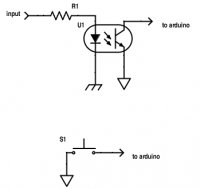
Many people have commented that the inputs are inverted. This was done intentionally so
that pull-down is active, and optical isolation or pushbuttons will work as expected. The internal
pull-ups are activated in the Arduino on all inputs.
2)
There is a new version of LadderMaker almost ready to publish. It will be version 108.
The bug that prevents more than one ADC input from working is fixed. There is also more
entries in arduino.rules so that more versions of the Nano will work under Linux.
3)
There remains an issue with two or more parallel (OR) rungs. OR rungs that are shorter
than the one above, that are not left justified do not work properly:
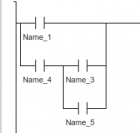 (Does not work.)
This does work:
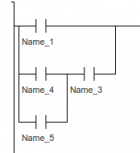 (Works.)
I am trying to get this bug fixed, but for now a workaround using internal outputs will be the
only option for multiple parallel rungs.
--Karl
Posted by admin on July 05, 2014
Ladder Maker verson 104 now has the following new features:
- Arduio Mega2560 support
- Pulse Width Modulated outputs (for the Mega2560 only)
- Analog inputs (for the Mega2560 only)
- + - ÷ x
- < > + ≤ ≥
Some notes: multiple PWM elements can be connected to a single output. The first active PWM
element will apply. This way several speeds can be used on a single output.
Timer and Counter can now be used with math. A 16 bit register stores their value. and is
available by charing the name.